



%20(3).png)
tl;dr
-
Carve now generates a full analysis dashboard the moment your territory scenario finishes
-
Customize it however you like by asking Carve for any metric, chart, map or summary in plain language
-
Share with stakeholders to explain multiple scenarios
-
Stop spending hours setting up pivot tables and tweaking charts to communicate your plan
Keep reading for all the details, or log in (or sign up!) to get started.
Your team's territory carve doesn't stop when you figure out account assignments.
You still need to understand whether the plan actually meets your goals, communicate it to the people it impacts, and produce something visual that leadership and the sales team can react to. In the past, that’s always meant spreadsheets, pivot tables, and so many PPT decks. It takes hours. And the output goes stale the moment anything changes.
Carve does it differently.
Introducing a whole new way to analyze your territory plan. Stop explaining your carve and show it instead.
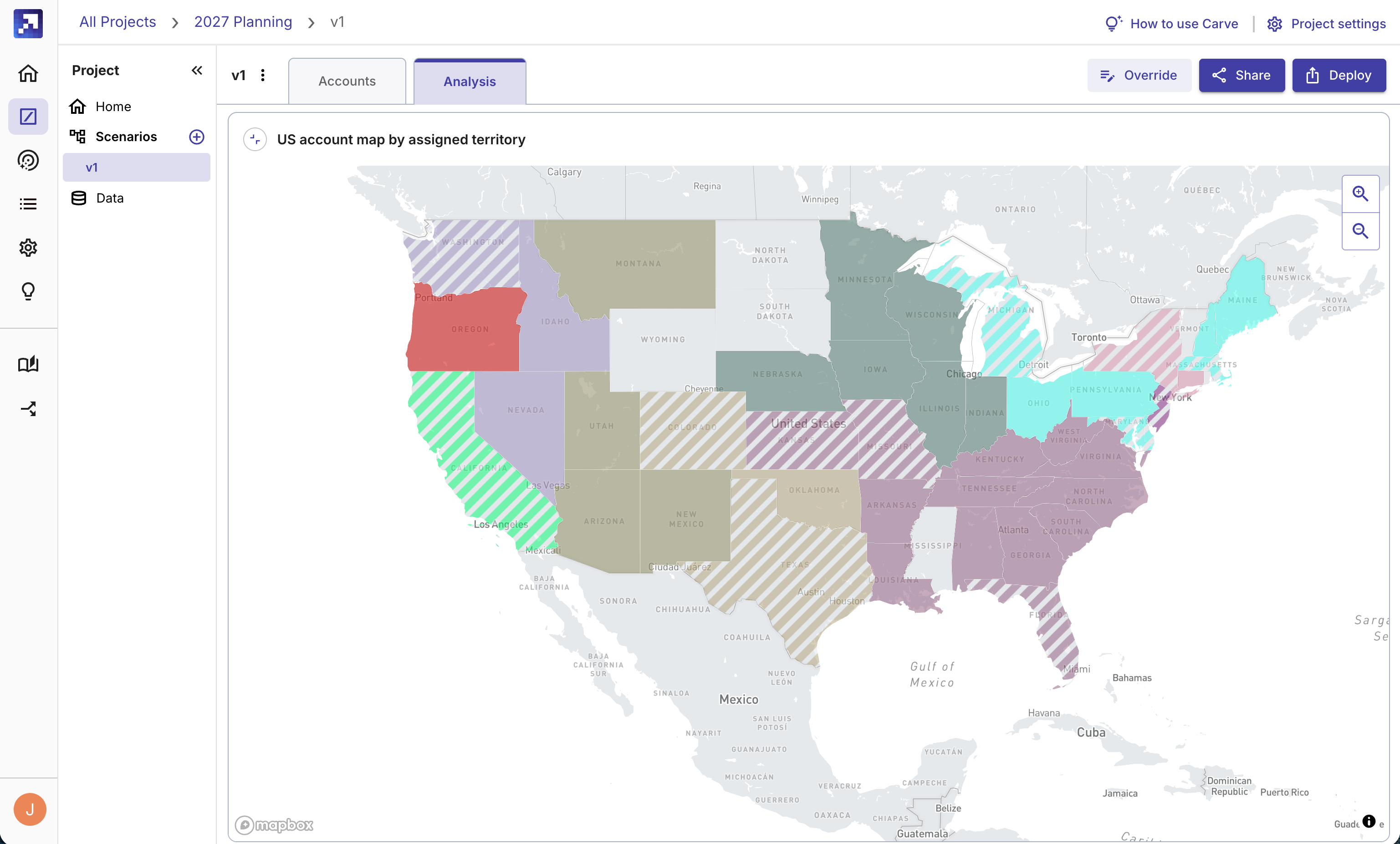
A full analysis, now built into Carve%20(3).png?width=3840&height=2160&name=app.gradient.works_carve_f00a7c35-be20-4f8e-aec9-b3c8cc3e25b8_scenarios_scenario=a3d3de8f-be33-4dbc-bd7a-83d7f07d1aa1%26scenarioName=Regional%26tab=analysis(Desktop%20screenshots)%20(3).png)
Carve is our territory planning feature, and helps RevOps teams and sales leaders iterate, build and rebalance territories. (If you're new to Carve, there's more here.)
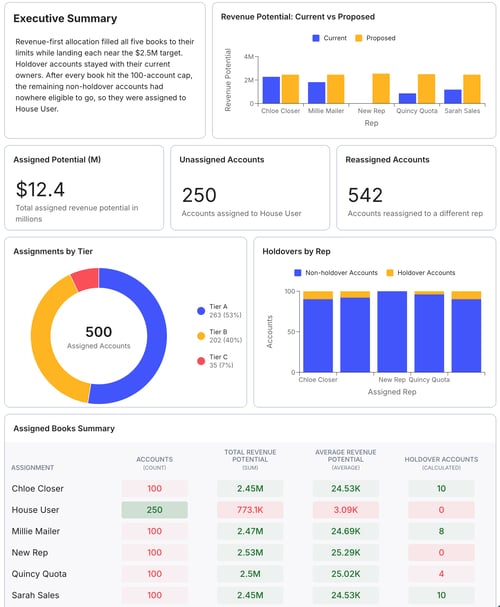
As of today, Carve now automatically generates a full analysis dashboard based on your results, as soon as you run a scenario. Get an assignment summary, geographic breakdowns, key metrics, rep comparisons, and more. Ready immediately. No setup. No spreadsheets!
That's the starting point. From there, you can customize it however you want.
Just ask for what you want
Unlike other complex dashboards, Carve is fast and easy to use to get exactly what you need. Carve makes some suggestions, then you tell it what else you want and it builds it for you.
For example, your dashboard can show:
-
Revenue potential by segment
-
Rep-by-rep comparisons to keep books balanced
-
Current territories vs potential territories to see what's changed
-
Executive overview the whole team can read
-
Comparison of holdovers vs new accounts
- Assignments by ICP score
The AI generates a live preview and drops it into your dashboard, in just a few seconds.
Carve is objectively faster than pulling the data into a spreadsheet and building it yourself. For example, let's say you want to compare revenue potential of the new territories relative to the old ones. With Carve, you can create this chart in less than a minute simply by describing what you want.
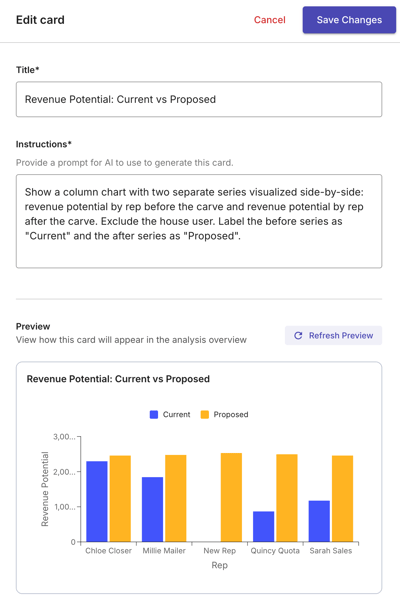 Before, you'd have to:
-
Download data into a tab in a spreadsheet
-
Create two different pivot tables
-
Merge the two pivot tables into a single table
-
Create a chart
.png?width=600&height=428&name=image%20(34).png)
That would take you at least 5-10 minutes, and that's to answer a single question about the new territory design. Now multiply that by every question you'll need to answer during your analysis. Carve does all this in seconds, and it does most of it automatically.
What else can you do? Any analysis you can think of. Card types include:
-
Metrics: Single-number callouts for key figures, like average revenue potential or account counts
-
Charts: Bar, line and donut charts to show comparisons and trends, like Tier 1 accounts per rep or current vs proposed accounts
-
Tables: Tabular rollups for data you want to dig into, like detailed book metrics across reps
-
Maps: Geographic views of your territory assignments, so you can visualize where accounts are concentrated and spot coverage gaps
- Narratives: AI-written summaries and analysis in plain language, like an executive summary
Territory plans need to be sold internally
One of the hardest parts of territory planning isn't building the plan. It's getting everyone to accept it. Reps want to know why their book looks the way it does. Leadership wants to see options, not just a single take-it-or-leave-it proposal.
You need to be able to quickly run multiple scenarios and tweak your requirements. With Carve, you can already do that in less than an hour.
And now, you can communicate the carve better.
How? Narrative cards give you AI-written explanations of the carve to share with the sales team. Charts and metrics give leadership what they need to compare scenarios and make a decision. And because each scenario gets its own dashboard, you can walk into the room with three carved options and a full visual analysis of each one.
"It's not just carving territories. It's getting the sales team excited about why you're putting them in the best position to win. Now I'm not spending time doing documentation—because the documentation is built into the product."
-Palen Schwab, Revenue Operations Head at Liquibase
Available now
The new analysis dashboard is rolling out to all Carve customers this week. It lives inside the Gradient Works web app, which also means you can easily deploy your territories to CRM in just a few clicks. Log in to see it, and let us know if you have questions.
If you're not yet a Gradient Works customer, Carve is available in all Gradient Works plans, including our free tier! Try it now for free.
The carve doesn't stop at assignments. Now, neither does Gradient Works.

.png)