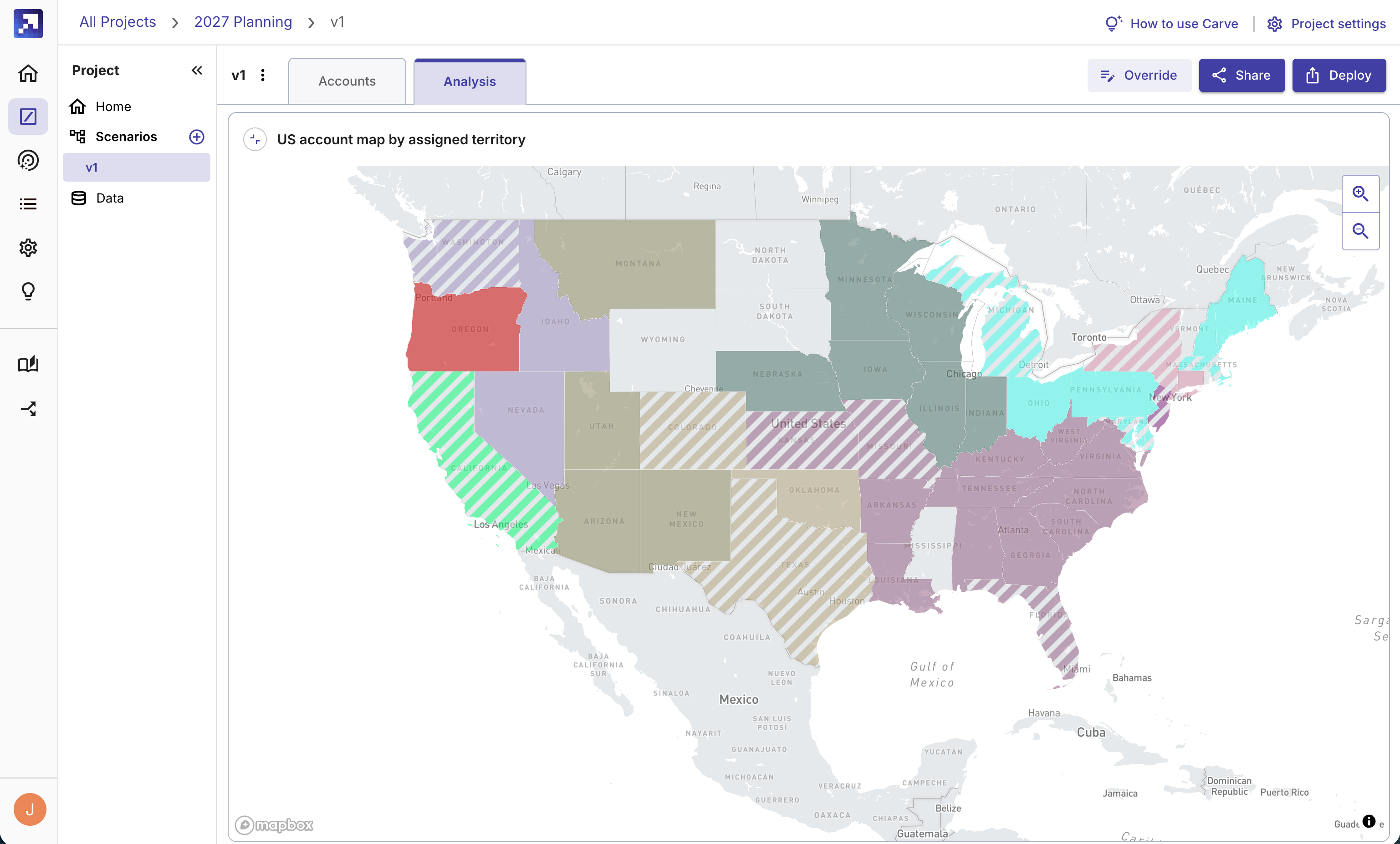
Carve is new and improved and can now manage every step of your territory planning process. That includes:
-
Design: Create one or more initial territory scenarios in minutes
-
NEW! Feedback: Collect and incorporate feedback from stakeholders
-
Deployment: Update account ownership and routing rules directly in CRM
-
Adjustment: Keep territories current as reps and accounts move
With Carve, you can now manage the entire end-to-end territory planning process, from design to feedback to deployment to management, in one system powered by an intelligent AI agent. And if you choose, you can orchestrate the entire process from your own agent via MCP.
What used to take weeks of manual effort can now be done in just a few hours with Carve. Get started for free (or log in to your existing account) or read on for more.
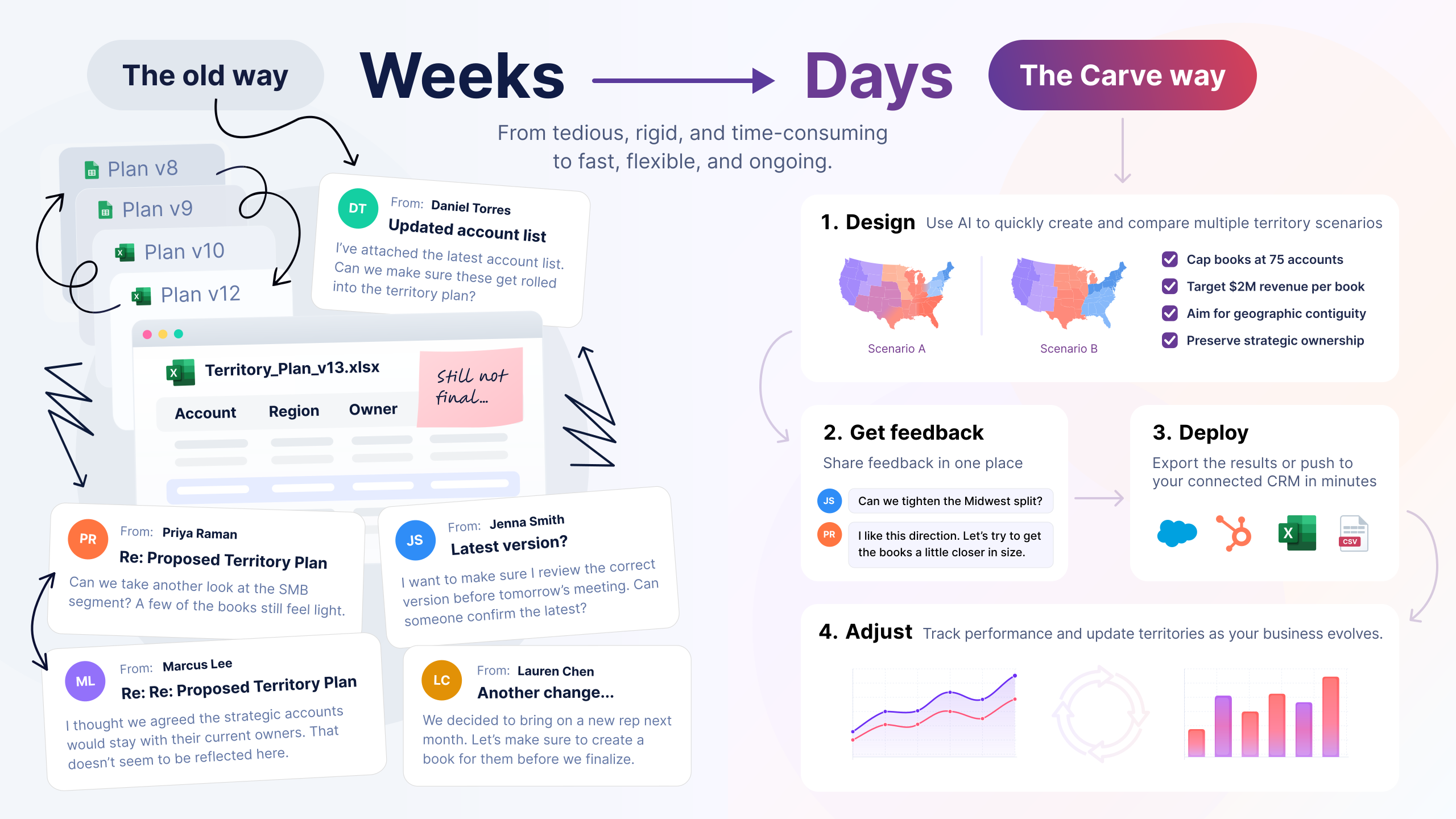
Why is territory planning so hard?
Every territory planning project actually requires four distinct jobs. (And the first two jobs are actually a loop that can go on for weeks.)
Phase 1: Territory design
Territory design is real work. Building the initial scenarios from scratch, usually in spreadsheets that aren't up to the task, takes forever. From requirements gathering to wrangling data, to tricky formulas and hand-editing a spreadsheet… Designing the first version of a territory plan is messy.
Phase 2: Feedback
Once you have a territory design, you then get to share it internally for feedback. You'll probably go through round after round of feedback from stakeholders across your organization, many of whom have competing goals. Each round sends you back to tweak the territory plan, which produces more feedback across Slack, email and meeting transcripts, most of it impossible to track. This part is probably harder - and definitely more time consuming - than the design phase.
Phase 2a: Repeat phases 1 and 2 as needed.
Maybe for weeks.
Phase 3: Deployment
Once you've got a plan, you then have to get it in CRM. Territory deployment is a whole process to update account ownership and routing rules. This can mean using Data Loader and CSVs, toggling automations off and on, and potentially dealing with complicated rollbacks if disaster strikes.
Phase 4: Adjustment
Once your new territories hit the real world, you'll probably find more things to tweak. And don't forget ongoing territory management over the course of the year. Keeping territories balanced and current (as reps move on, new reps come in, management changes strategy) is a slog. Most territories just go stale until the next annual cycle forces a redo.
So this is why territory planning starts in September and often doesn't end until February. It's a lot of damn work.
But it just got a lot easier!
Manage the full end-to-end territory process with Carve
With Carve, you can now manage the full territory process, from design to feedback to deployment to management, in one platform.
Carve starts by helping you design and adjust territory plans with our intelligent territory agent. You can create a scenario in just a few minutes. You can come up with multiple scenarios, stress-test them and prepare them for feedback in less than an afternoon.
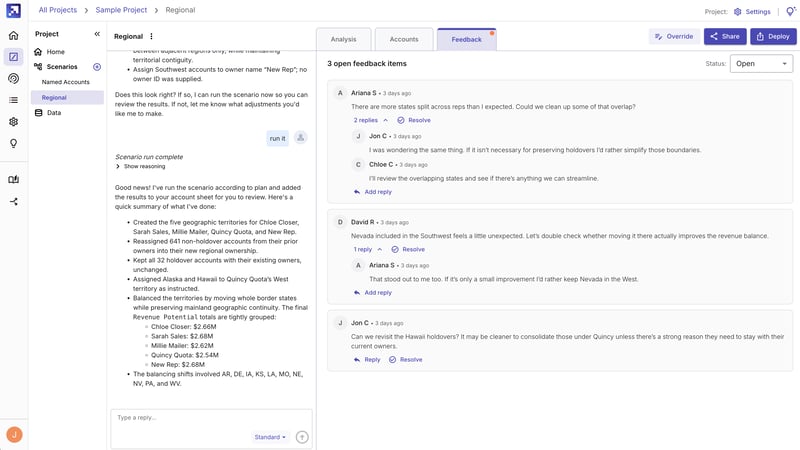
And then, Carve can manage feedback collection. Collect feedback from sales leadership and other stakeholders, incorporate that feedback, and iterate on territory plans in the same system you built the plans in.
Stakeholders can review and comment on territory plans directly in Carve, so you don't lose any feedback as you revise. They can even ask for changes or overrides. Then the Carve agent incorporates the feedback as you instruct it, and you can send back a new version of a territory scenario for review. And repeat as much as you like, without ever losing a comment and tracking scenario versions as you go.
No more spreadsheets called "2027 Territories v7 final FINAL.xlsx" ever again.
Then when you've finally got territories the team is happy with, you can deploy to CRM and keep territories clean all year long directly from the Gradient Works platform. Read more about our territory management and balancing functionality here.
That means, you can now run an end-to-end territory planning cycle with one platform: Gradient Works!
Carve is your agent's territory analyst
The Carve AI agent is a sales territory expert. You've been able to chat with it in Gradient Works for the past year to design and refine territory scenarios. And more recently, we made the Carve agent accessible in your agent via our MCP.
But even better, you can now run your entire territory planning process without ever touching our UI if you want.
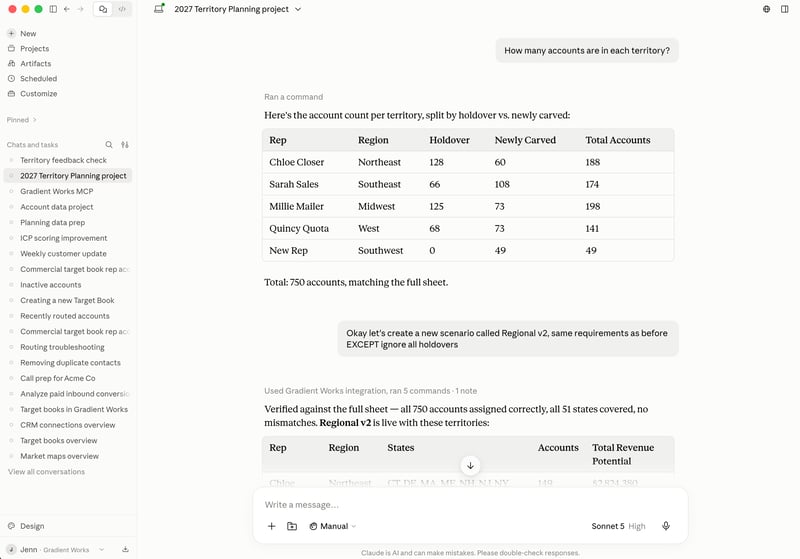
With our MCP, your agent can work with Carve directly instead of you driving every step by hand. You can run a full territory planning process, from design to deployment, directly from your agent. Your agent (Claude, ChatGPT, Gemini or whatever you use) works with Carve, making it easy to bring in data and connect what's happening in Carve with your other systems.
Carve is like hiring an analyst for territory planning. You outsource the vast majority of the work to it if you want. It can take in your data and high-level requirements, builds scenarios, solicits and incorporates feedback, tracks overrides, finalizes the plan, and deploys it to Salesforce.
You already have access to other tools, knowledge and workflows that you want to bring to the territory design process. You can bring Carve into your own agent and use it alongside your other tools. Your agent orchestrates, and Carve brings the territory expertise.
Start territory planning with Carve for free
As planning season starts to ramp up, give Carve a try for your territory planning.
The free plan will get you started, and it's easy to buy additional credits if you need more in Carve. You never have to subscribe if you don't want to. Sign up now!